cloud_offOffline-Ready Navigation

Offline-Ready Fishing Navigation

Download maps, charts, and HD Bathymetry where supported before the trip so GPS navigation, routes, and waypoints stay with you offshore

Offline maps working without cell service
Decision guide

Decide what deserves offline storage before service drops.

Offline maps are not just a download feature. They are the handoff point between connected planning and the low-service water where the plan has to stay usable.

Problem

Anglers often download too much, too late, or the wrong area. The useful question is which route, structure, and backup plan need to remain visible offshore.

Proof

Fish Fathom keeps downloaded charts, supported HD Bathymetry, routes, waypoints, and GPS context available after the trip plan is narrowed to a specific area.

Workflow

Choose the target area, inspect structure and conditions while connected, save waypoints and route options, download the supported map area, then confirm storage before departure.

Limits

Fresh Offshore Conditions, AI, recommendations, and other connected features still require service; coverage and storage needs vary by region and selected layers.

How to Download Maps for Offline Use

1

Select Your Region

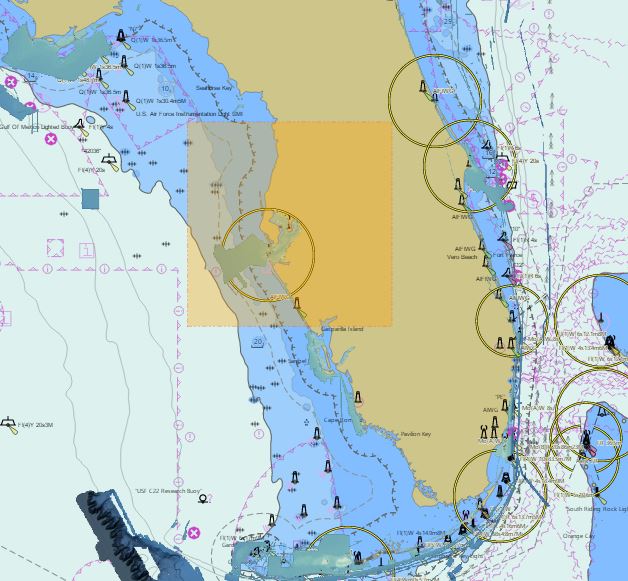
Pan and zoom to the area where you'll be fishing, then choose the section of coast or offshore water you want available offline.

2

Choose Map Layers

Select the offline assets you want on the device, including charts and supported HD Bathymetry areas. More detail uses more storage.

3

Download & Go

Download before the trip and you're ready to navigate with GPS, routes, and waypoints even when service drops.

Why Offline Capability Matters

When you're 50 miles offshore targeting Grouper, cell service can disappear quickly. If you did not prepare the map area ahead of time, chart context, waypoints, and route planning can become harder to use when you need them most.

Fish Fathom was built for offshore and coastal anglers who need dependable navigation when coverage drops. With downloaded maps, charts, and HD Bathymetry where supported, the app keeps GPS navigation, saved routes, and saved waypoints available offline.

Download what you need before leaving the dock, then run the trip without relying on a weak signal. Fresh Offshore Conditions SST, Plankton/chlorophyll tiles, Captain Brad AI, and connected recommendation features still require an internet connection, but your downloaded navigation tools stay available on the water.

What Works Offline

map

NOAA ENC Charts

Official electronic navigation charts with depth contours, navigation aids, and hazards available offline once downloaded.

terrain

HD Bathymetry

High-definition underwater terrain visualization and supported BlueTopo map layers stay available for downloaded areas when coverage is supported.

location_on

Waypoints & Routes

Create, edit, and navigate saved waypoints and routes offline once the area is downloaded.

explore

GPS Navigation

Track your position against downloaded map context, saved routes, and waypoints using device GPS.

public

Unlimited Regions

Save the regions you need for upcoming trips so your core navigation workflow stays available beyond cell range.

bolt

Hyper Performance

Downloaded maps render quickly without waiting on a weak connection or stalled tile requests.

water

Clear Connected-Layer Limits

Fresh Offshore Conditions SST and Plankton/chlorophyll require connectivity; previously viewed tiles should be treated as stale planning context when service is flaky.

Topic cluster

Offline prep belongs inside the full trip-planning workflow.

Download decisions should point back to the route, map layers, weather context, and connected features that shaped the plan.

Storage Requirements

Small Region (10 sq mi)

Approximately 50-100 MB

Example: Local reef area, nearshore fishing grounds

Medium Region (100 sq mi)

Approximately 500 MB - 1 GB

Example: Entire bay system, offshore ledge area

Large Region (1,000 sq mi)

Approximately 5-10 GB

Example: Entire coastline section, major fishing region

Tip: Download only the specific areas you fish to save storage space. You can always download additional regions later when connected to WiFi.

Offline Coverage Area

  • US Coastal Waters: East Coast, West Coast, Gulf of America - NOAA ENC coverage where available
  • Hawaii: Hawaiian waters with supported NOAA charts and available HD Bathymetry
  • Great Lakes: Superior, Michigan, Huron, Erie, Ontario - supported navigation chart coverage
  • Alaska: Supported chart coverage for many Alaskan waters and fishing areas
  • Offshore: Download supported chart areas before leaving service

Benefits of Offline Navigation

  • Fish Offshore: No cell service? Download your core navigation map before the trip and navigate confidently offshore.
  • Battery Savings: No cellular radio means longer battery life when you're on the water all day.
  • Instant Performance: Maps load instantly without waiting for network requests or tile downloads.
  • Save Data Costs: No cellular data usage while navigating - perfect for limited data plans.
  • Peace of Mind: Know your downloaded maps, routes, waypoints, and GPS context are ready before you lose phone signal.
  • Clear Boundaries: Downloaded maps and navigation work offline, while fresh Offshore Conditions SST, Plankton/chlorophyll, Captain Brad AI, and connected recommendations require internet.

Ready for Offline-Ready Fishing Navigation?

Download your maps before the trip, then keep map context, routes, and waypoints available when service drops offshore.