Marine forecast windows
Track whether the next useful opening has the wind, wave height, wave period, and duration your trip requires.
Fish Fathom brings marine forecast windows, buoy conditions, wind, waves, offshore water context, and alerts into the trip-planning workflow so Premium anglers can make clearer go or no-go decisions.
Watch the buoy forecast before committing fuel, crew, and time.
A fishable opening depends on the route, the crew, the target area, and how the forecast changes over time. Use Fish Fathom to keep the conditions that matter in one planning view instead of bouncing between disconnected checks.
Track whether the next useful opening has the wind, wave height, wave period, and duration your trip requires.
Use supported buoy and station context to compare what is forecast with the water you are actually watching.
Turn conditions into a practical call about fuel, crew, timing, route exposure, backup plans, and whether to wait.
Fish Fathom focuses the planning read on marine conditions: buoy forecasts, real-world station observations, wind and waves, and offshore water context where supported by available layers.
Keep the sea-state signals that shape comfort and risk near the same map context you use for the run.
Review NOAA-backed SST context where Offshore Conditions is supported, then compare water edges with your route.
Position the page for supported offshore condition layers, including water-color context as those signals become available.
Save the window you care about and return when Fish Fathom sees the forecast lining up with your thresholds.
Compare weather with routes, waypoints, bathymetry, and offshore structure rather than judging the forecast in isolation.
Use alerts for planning support, then confirm official marine forecasts and local conditions before running.
Weather Windows connects recurring planning with alert-driven follow-up so anglers can monitor a route or buoy window before the weekend, then make the final call with the conditions that matter already in view.
Start from the buoy, route, or offshore zone that best represents the trip.
Choose the wind, wave, period, and minimum-duration thresholds that make the run worth considering.
Check SST, mapped structure, saved spots, and supported offshore layers before the plan becomes real.
Use alerts as the prompt to inspect again, confirm official forecasts, and decide whether to go.
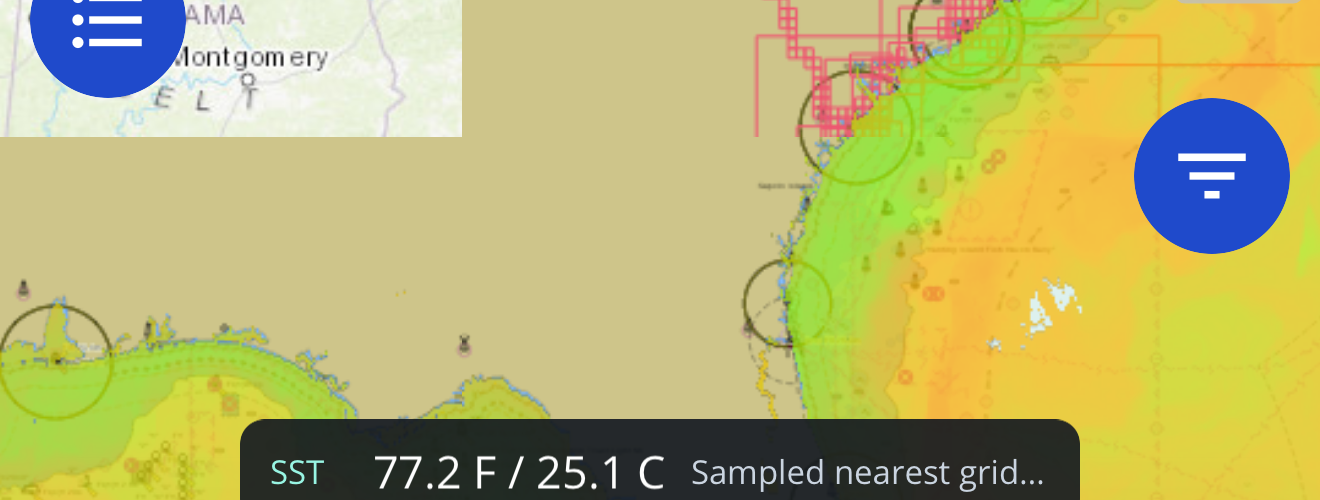
For offshore trips, weather is only half of the decision. Pair the marine forecast with sea-surface temperature, mapped structure, routes, waypoints, and supported offshore condition layers so the trip plan has a clearer reason behind it.
Explore Offshore ConditionsIt is a planning view around a marine forecast opening, with wind, waves, period, buoy context, and trip timing considered together.
Weather Alerts are the saved notification workflow. Weather Windows is the broader planning page that explains how those alerts connect to route, buoy, and offshore condition decisions.
No. Fish Fathom should be treated as supported-layer planning context. SST is available through Offshore Conditions where supported, and other offshore signals depend on product and source availability.
No. Alerts help you notice a possible opening, but the final decision still requires official marine forecasts, local judgment, required gear, and current on-water conditions.
Download Fish Fathom and use weather windows, buoy alerts, and offshore context as part of your Premium planning workflow.